
Comfrt
ComfrtShopping
5.0150.00 Reviews
- Version
- 1.0.392
- Installs
- 50.00K
- Age Rating
- Everyone
Screenshots




Our Review of Comfrt
 Analysis by Appyee
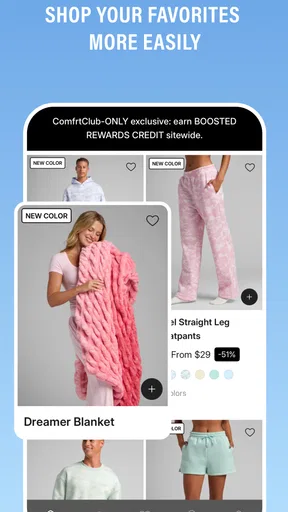
I approached Comfrt as a shopping app for one very specific kind of purchase: comfortable clothing and homewear that you can browse when you want something softer and more relaxed than ordinary everyday basics. Its focus is premium-feeling hoodies, blankets, and loungewear, so the experience is less about comparing thousands of unrelated products and more about finding a cozy item without leaving a general-purpose shopping app.
That narrow focus is its biggest strength and also the first thing to understand. I would not open it when I need a broad marketplace, a large selection of unrelated brands, or a tool for comparing every possible clothing retailer. I would open it when I already have a fairly clear idea that I want a hoodie, blanket, or lounge piece and prefer a dedicated browsing experience. The app is free to install, aimed at Everyone, and developed by Comfrt itself.
My overall impression is positive, but with a practical qualification: the app is most useful when the shopping process stays simple. If you know what type of item you want, it can make browsing feel focused. If you are trying to solve a delivery issue, recover a stalled checkout, or investigate a problem caused by your device or connection, the app may not be the real source of the trouble. That distinction matters more here than the cozy branding.
Where the shopping experience can get stuck
I find the main sticking point is the moment a pleasant browse turns into a precise product decision: comfort is personal, and a screen cannot settle questions of fit or feel. In this section, I’d look at ways to narrow choices by intended use before checkout, then consider which setup checks can make that decision-making smoother.
Browsing is easy until the decision becomes specific
The first potential friction is not necessarily technical. It is decision-making. A focused clothing app can reduce the noise found in a general marketplace, but it can also make you examine details more carefully because the purchase is centered on feel, fit, and intended use. A hoodie for commuting is not the same choice as a hoodie for sleeping, traveling, or wearing over several layers.
I found it helpful to decide the use case before browsing deeply. For example, if I wanted a warm layer for a cool evening, I would think about what I normally wear underneath it and whether I prefer a relaxed silhouette. If the goal were a blanket for the sofa, I would consider who will use it and whether easy storage matters. This simple preparation prevents endless scrolling through visually similar cozy products.
The app’s concentrated catalog is convenient for inspiration, but it is not a replacement for checking practical product information before committing. I would slow down at the point where color, size, or intended fit becomes important. A soft-looking product image can create a strong first impression, yet it cannot decide whether the item suits your wardrobe or living space.
Checkout problems are not always app problems
When a shopping app appears to hang, the cause may be a weak connection, a temporary interruption between the app and the store service, or an issue with the payment process. Repeatedly tapping the same button is usually the least helpful response because it can create uncertainty about whether an order was submitted.
My safer habit is to pause after a failed-looking action, check whether the screen changed, and avoid submitting the same purchase several times in a row. If the app returns to the product page or cart, I would review the cart carefully before trying again. This is especially important when a purchase contains a size or color that might be selected differently after a refresh.
The most useful troubleshooting rule is to separate a display problem from an order-status problem. A frozen screen does not automatically mean that no transaction occurred. Before restarting the process, I would look for any visible confirmation inside the app and check the relevant account or purchase area if one is available. That approach is slower by a minute but safer than guessing.
Product expectations need a little discipline
Comfrt is built around a comfort-first idea, which makes it appealing for people who value relaxed clothing and soft home accessories. Still, “comfortable” is personal. Some users prefer a close fit, while others want generous room. Some want a layer that works outdoors, while others mainly want something for the house.
I would avoid choosing only from the product photograph. Think about the garment’s role in your routine, the clothes you usually combine with it, and whether you want it to feel like a dedicated lounge item or a versatile everyday layer. For blankets, consider whether the item will stay on a sofa, travel between rooms, or be folded away frequently. These questions are more useful than simply selecting the product that looks softest on screen.
Setup checks that prevent avoidable frustration
Before browsing, I’d make sure my phone meets the Android 7.0 minimum and that I have a stable connection, then keep the current app version in mind if something behaves oddly. I’d also decide what I need the item to do and review the cart carefully before submitting an order. Those small checks set up a more confident session, which leads naturally to the practical setup steps below.
Start with a clean, stable session
Because Comfrt is a shopping app rather than a general social or productivity tool, the setup should be straightforward. I would begin by installing the current release available for the device and making sure the phone meets the stated minimum of Android 7.0 or later. The current version is 1.0.392, and keeping the app current is a sensible first check when a screen behaves unexpectedly.
I would also make sure the phone has a stable internet connection before browsing or checking out. Switching between an unreliable mobile signal and crowded Wi-Fi can make images, product details, or cart actions appear inconsistent. If the app opens but content loads slowly, I would test another connection before assuming that the catalog itself is unavailable.
A useful setup habit is to close the app completely and reopen it after changing networks. This gives the shopping session a clean start without immediately resorting to more disruptive measures. I would not clear anything important or reinstall the app as a first response, especially if I had already reached an advanced stage of a purchase.
Prepare the purchase before opening the final screen
Shopping apps are easier to use when the decision has already been narrowed down. Before moving toward checkout, I would confirm the product type, preferred color, size, and quantity in a quiet moment rather than making those choices hurriedly while a page is still loading. This is a small workflow improvement, but it reduces mistakes caused by rushing through a visually appealing catalog.
For a hoodie, I would compare the available sizing information with a garment I already own rather than relying only on memory. For a blanket, I would think about where it will be used and whether the selected option fits that purpose. The app can help me browse the collection, but it cannot replace that personal comparison.
I would also review the cart once before submitting anything. In my experience, this is where a focused shopping app becomes most useful: the browsing stage may be enjoyable, but the cart is where I can catch an accidental variation, an unwanted duplicate, or a choice made while exploring. A deliberate final review is more valuable than repeatedly going back and forth between product pages.
Keep the app’s role clear
Comfrt is a storefront experience, not a universal shopping assistant. I would use it to explore Comfrt’s own range and make a purchase decision, while using the phone’s normal settings for connection, storage, and system-level checks. If the app works normally but a particular device setting blocks notifications or interrupts a payment handoff, changing random settings inside the app will not solve the underlying issue.
The age rating of Everyone makes the app broadly accessible, but that does not mean every shopping decision is equally simple for every user. Someone buying a gift may need to spend more time checking the recipient’s preferred style and size. Someone shopping for a household may need to decide whether a blanket is intended for one person or shared use. The accessible rating describes who can use the app; it does not remove the need for careful product selection.
Use the reputation signal without treating it as a guarantee
The app currently shows a 5.0 average from around 754 ratings, with around 150 written reviews, and it has passed 50 thousand installs. Those figures suggest that the shopping experience has attracted a positive response, but I would still treat them as a starting point rather than proof that every product will suit every person.
Ratings are especially limited for clothing because comfort, fit, and fabric preference vary so much. I would pay more attention to the substance of written feedback when deciding whether a product matches my needs. A high average can tell me that many people enjoyed the experience, but it cannot tell me whether a particular hoodie works for my preferred fit or whether a blanket suits my room.
Recovering from a stalled browsing or checkout flow
If product images or details stop loading, I would first wait briefly, then check the connection and restart the app. If the same problem appears only on one network, the network is a stronger suspect than the catalog. If it appears after an app update or on every connection, checking whether another version is available is reasonable.
If the cart looks empty after a restart, I would not immediately assume that a previous order failed. I would review any visible order or account area, look for a confirmation message, and check the payment method’s activity before attempting the purchase again. This workflow is particularly important when the app appeared to freeze after the final action.
If an item disappears from the cart while browsing, I would rebuild the selection slowly and confirm every option again. A recovered session may not preserve every choice exactly as I remember it. I would rather spend another minute verifying the product than discover later that I selected the wrong size or variation.
For a login or account-related interruption, I would close and reopen the app, verify the connection, and carefully re-enter the requested information. I would avoid making several rapid attempts because that creates more confusion about which session is active. If the problem continues, the sensible next step is to use the app’s own support or account-recovery route rather than trying unrelated phone settings.
When the app is not the cause
Some problems happen after the app has done its part. A payment may be delayed by the payment provider, a device may block a handoff, or a network may interrupt communication at the wrong moment. The fact that the problem appears while using Comfrt does not prove that Comfrt caused it.
This is why I separate four situations: the catalog will not load, the cart will not update, the checkout screen will not complete, and the order status is unclear afterward. The first two are often worth addressing with a restart or connection check. The third requires patience and careful confirmation. The fourth should be investigated through the visible order information and payment activity before repeating the transaction.
I would also avoid judging the app based on a single slow session. Shopping performance can vary with the phone, network, and timing. A pattern that happens repeatedly is more meaningful than one interrupted visit. Conversely, if every other app is also struggling to connect, Comfrt is probably only one symptom of a wider device or network issue.
There is another important boundary: the app cannot make a personal fit decision for me. If I am unsure whether a relaxed hoodie will work with my usual clothes, that is a product-choice question, not a technical failure. If I need a highly specialized outdoor garment, a broad clothing retailer may be a better destination. If I need to compare many brands by material, cut, or independent seller, a general marketplace may offer more useful breadth.
How it compares with ordinary shopping alternatives
Compared with a general marketplace, Comfrt feels more intentional. I would expect less distraction from unrelated categories and a clearer path toward cozy clothing or homewear. That is valuable when I already want this type of product. The trade-off is that a general marketplace may be better for price comparison, brand variety, or finding a very specific technical feature outside the app’s focused range.
Compared with browsing a retailer’s website in a mobile browser, a dedicated app can feel more convenient for returning to the same shopping environment. The advantage is strongest for someone who expects to browse this collection more than once. The browser may be preferable for a one-time visit, for users who do not want another app on their phone, or for anyone who prefers keeping shopping sessions separate from installed apps.
Compared with visiting a physical store, the app is better for browsing at home and considering a purchase without traveling. The physical store remains better when I need to touch a fabric, judge thickness directly, or try on a garment before deciding. This is not a flaw unique to Comfrt; it is the normal trade-off of buying comfort-focused products through a screen.
Who will get the most from it
I think Comfrt is a good match for someone who regularly buys hoodies, blankets, and loungewear and wants a focused place to explore those items. It also makes sense for gift shoppers who already know the recipient enjoys relaxed, cozy clothing. The free price makes trying the app low-risk from an installation standpoint, while the focused catalog keeps the purpose clear.
A realistic everyday scenario would be choosing a hoodie for a weekend trip. I would open the app before packing, decide whether I want a standalone layer or something roomy enough over a shirt, compare the available choices, and review the cart before ordering. The app is useful in that situation because it keeps the search centered on the item I actually need instead of making me filter through unrelated products.
It is less suitable for someone who wants a broad fashion marketplace, immediate in-person fitting, or extensive cross-brand comparison. I would also skip it if I were shopping for performance clothing with specialized technical requirements, unless the available product information clearly matched that need. A focused comfort store should be judged on how well it serves comfort shopping, not on whether it replaces every other retail option.
My practical verdict
After using Comfrt as a dedicated shopping destination, I see its value in focus rather than complexity. It gives comfort-minded shoppers a direct route to hoodies, blankets, and loungewear, and its strong rating signal and growing install base make it easy to understand why people are trying it. The developer is Comfrt, the app is free, and the current release is 1.0.392, so the basic barrier to testing the experience is low.
My advice is to use it deliberately: decide what the item needs to do, check the available product details, verify the cart, and treat a stalled screen carefully before repeating a purchase. If something goes wrong, test the connection and restart the session before assuming the catalog or checkout is broken. Most importantly, distinguish technical trouble from a product-fit question and from a payment or order-status question.
I recommend Comfrt when you want a focused, comfort-first shopping experience and already have a hoodie, blanket, or loungewear purchase in mind. I would choose a broader retailer when comparison range matters more than a curated destination, and I would choose a physical store when touching or trying the item is essential. For the right shopper, the app is pleasantly direct; for everyone else, its narrow focus is exactly the reason to look elsewhere.
Verdict
Strengths of Comfrt
- Simple interface makes browsing comfort-focused products easy.
- Helpful product details support more informed purchasing decisions.
- Convenient mobile shopping experience for users on the go.
- Order information can be accessed directly from the app.
- Suitable for shoppers seeking casual, comfort-oriented apparel.
Limitations of Comfrt
- Product availability may vary by size, color, and location.
- Some items may feel expensive compared with similar casualwear.
- Shipping times can differ depending on destination and stock.
- Limited features beyond shopping may reduce repeat app usage.
- Returns or exchanges may require checking the store’s specific policy.
Similar Picks in This Category
View All
SHEIN-Shopping Online
Roadget Business PTE. LTD.4.8

Amazon Shopping
Amazon Mobile LLC4.4


Mercado Libre: Compras online
Mercado Libre4.8

Wish: Shop and Save
Wish US Holdings LLC4.7

Alibaba.com - B2B marketplace
Alibaba Mobile4.4
Frequently Asked Questions
What is Comfrt, and what can I use it for?
Comfrt is a wellness-focused app designed to help users create a calmer, more supportive daily routine. Depending on the version available in your region, it may include guided content, personalized recommendations, mood or habit tracking, and tools for relaxation. Before downloading, check the official store listing to confirm the current features, supported devices, and whether the app matches your specific wellbeing goals.
Is Comfrt free to download and use?
Comfrt may be available to download at no initial cost, but some features or content can require a subscription, one-time purchase, or in-app payment. I recommend reviewing the pricing section in the App Store or Google Play listing before starting a trial. Also check renewal terms carefully, because free trials commonly convert into paid subscriptions unless canceled within the stated period.
Does Comfrt require an account or personal information?
The amount of information required can depend on which features you use. Comfrt may ask you to create an account so it can save preferences, track progress, or synchronize data across devices. It may also request wellness-related details to personalize recommendations. Before registering, review the privacy policy and permissions, and avoid entering sensitive information that is not necessary for the app’s core functions.
Can Comfrt be used without an internet connection?
Some parts of Comfrt may work offline after content has been downloaded, while account synchronization, personalized recommendations, updates, and certain media features may require an internet connection. Offline availability can also vary between Android and iOS versions. If you plan to use the app while traveling or with limited data, test the desired content in advance and confirm what remains accessible without a connection.
Is Comfrt suitable for mental health support or medical treatment?
Comfrt can be useful as a general wellness companion, but it should not be considered a replacement for a licensed therapist, doctor, or emergency service. Any exercises, tracking tools, or recommendations should be treated as supportive rather than diagnostic or therapeutic treatment. If you are experiencing serious distress, a crisis, or symptoms that affect daily life, contact an appropriately qualified professional or local emergency service.
